
Like most people, I’ve always liked the idea of a digital personal assistant that could handle repetitive yet complex tasks. Checking emails, responding, managing my calendar etc.
With the availability of powerful yet cost-effective tools, and a little bit of technical know-how I decided to build Rex—an assistant that could automate workflows, manage emails, and help me stay organized.
How I set it up
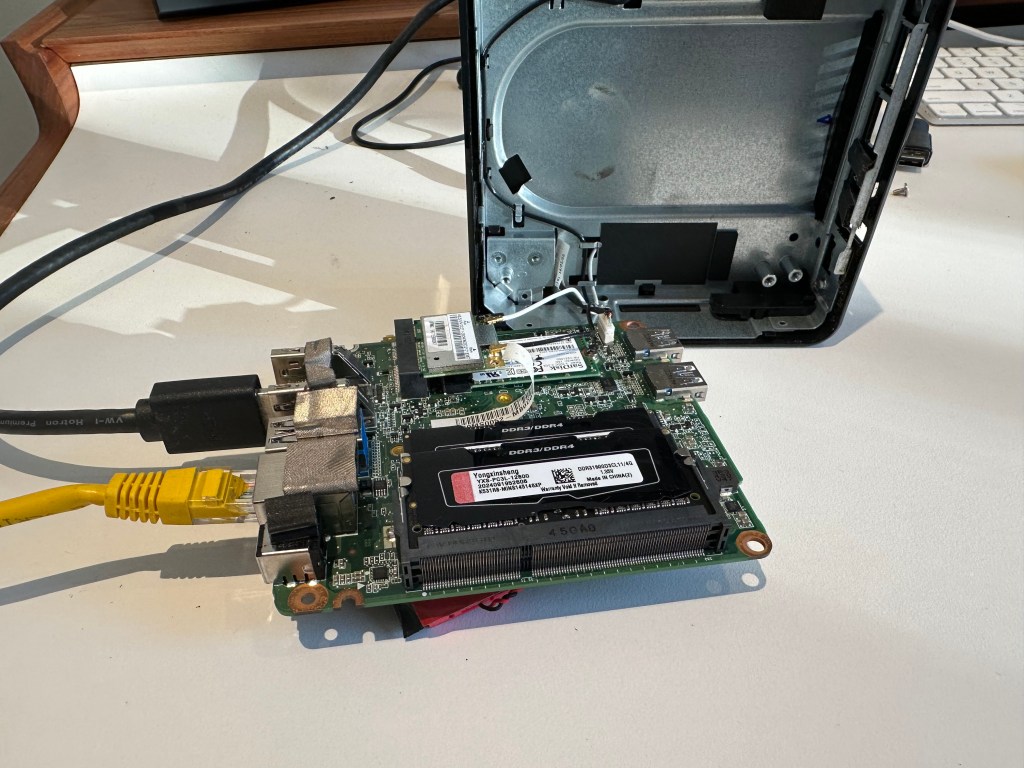
To manage workflows, I chose n8n, an automation tool that connects different services and APIs. It’s really great to use with a great UI and many pre-built connectors. While there is a hosted version of n8n, I opted to host it myself for greater control and it’s free 🙂 I had an old Chromebox N60 that wasn’t being used, so I upgraded the RAM and installed Linux Mint on it. Since Rex wouldn’t be running large AI models locally, the hardware didn’t need to be particularly powerful and this is more than adequate.
I installed Docker and set up n8n to run in the background—this became the foundation for managing Rex’s workflows. n8n allowed me to build automations without writing excessive code, making it easy to integrate OpenAI and other services as needed.
Adding AI with OpenAI’s API
To give Rex the ability to understand and respond to queries, I connected it to OpenAI’s API. Whenever I ask a question—through a chatbot, email, or another input—n8n processes the request, sends it to OpenAI, and returns a response in a useful format.
This setup allows Rex to provide quick answers, summarize information, and generate insights based on context. The interaction feels natural, and because everything runs through n8n, I can tweak workflows and responses as needed.
What Rex Can Do
One of the biggest advantages of building my own AI assistant is customizing its capabilities to fit my needs. Some of Rex’s key functions include:
- Managing My Schedule – Rex can schedule meetings, send invites, and update my calendar based on emails and messages.
- Email Assistance – Rex can draft and send emails on my behalf, helping me stay on top of communications.
- Tracking Unanswered Emails – Every day, Rex updates me on emails I haven’t responded to—not just unread messages but those that require a reply.
- Daily Briefings – Each morning, Rex gives me a rundown of my upcoming meetings, important emails, and top news headlines tailored to my interests.
- Researching Contacts – Before meetings, Rex gathers relevant information about the people I’m meeting with, providing context that helps me prepare.
- Smart Notifications – Rex tracks important updates on topics I follow and sends me summaries.
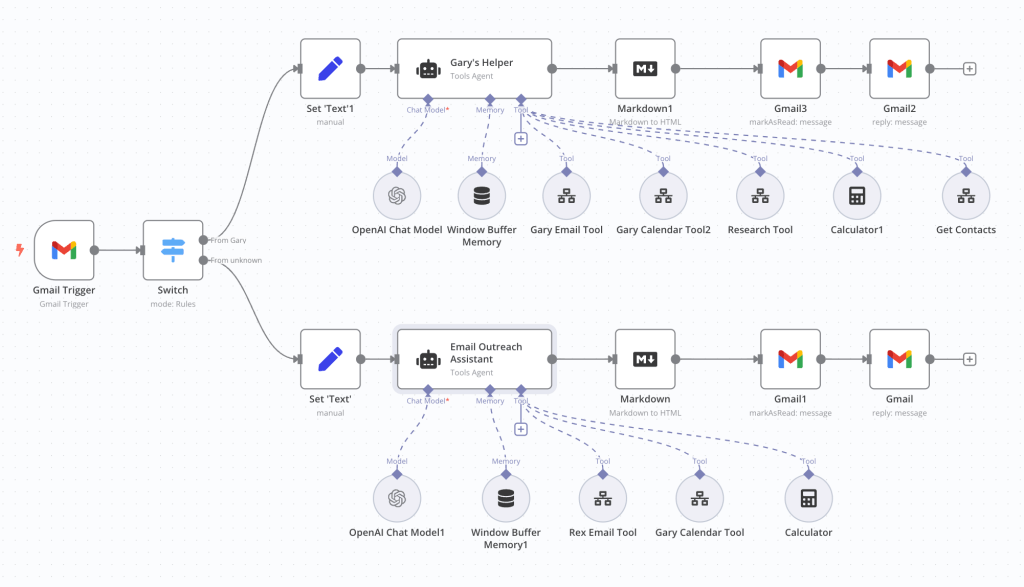
Since n8n is modular, I can continuously add new functions, making Rex more useful over time. Maybe I should make him speak? Let me know what you think in the comments.
Final Thoughts
Building Rex was a fun and practical project. Instead of relying on third-party AI assistants with limited customization, I now have a system that works exactly how I want it to. Since it’s running locally on my Chromebox, I have full control over how it operates, and I can continue improving it over time.
If you’re into automation and AI, setting up something like this is definitely worth exploring. With the right tools—OpenAI, n8n, and a solid hardware base—you can create a personal assistant that fits your needs without being tied to a cloud-based service.
And if you’re wondering why I called it Rex—well, that’s the name of my dog. He’s loyal, fun, and always learning, just like this assistant!
If you want to learn more about the set up then email Rex at rexaihelper@gmail.com to schedule time or, if you have any problems (he’s still learning) then you can contact me directly.

 CCO Advisor
Leave a comment